TouchMon HD1.3.3
Publisher Description
** THIS APPLICATION WILL BE REMOVED FROM THE STORE AT THE END OF 2016 **
TouchMon for Nagios - now on the iPad
****************
if you like to test TouchMon first, try the free iPhone version -> TouchMon Lite
****************
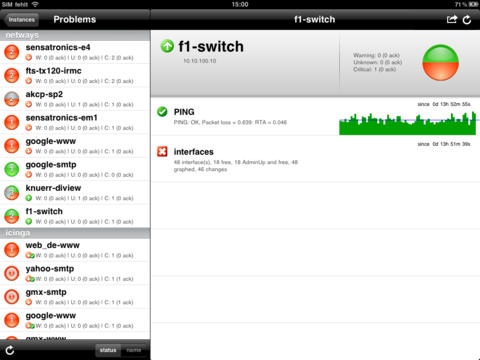
TouchMon for Nagios accesses your Nagios servers and natively displays the data on your iPad.
Unlike other available Nagios frontend solutions, it does not require any changes in your server-side configuration. Just enter the server URL, username and password (you can also optionally ignore self-signed SSL certificate errors) and TouchMon for Nagios displays your network state in a meaningful way.
With TouchMon for Nagios, you are also able to set downtimes and acknowledge problems - for both hosts and services.
From now on, you don't have to pull up Safari to know what's going on - just open TouchMon for Nagios and it's all there; nicely partitioned into 'Problems', 'Hosts' and 'Hostgroups'.
You can also set TouchMon for Nagios to reload the displayed data after a defined period of time has passed. Alternatively, you can shake your device to force a reload, or simply press the reload-button.
Monitor your System health.
Acknowledge problems.
Set downtimes.
Everwhere.
Anywhere.
TouchMon for Nagios has been tested with Nagios 2.10 - 3.2.3 as well as with Icinga 1.3 - 1.6. If necessary, updates for new Nagios versions will be provided.
Requires iOS 4.3 or later. Compatible with iPad.
About TouchMon HD
The company that develops TouchMon HD is s-team IT solutions GmbH. The latest version released by its developer is 1.3.3.
To install TouchMon HD on your iOS device, just click the green Continue To App button above to start the installation process. The app is listed on our website since 2011-05-18 and was downloaded 24 times. We have already checked if the download link is safe, however for your own protection we recommend that you scan the downloaded app with your antivirus. Your antivirus may detect the TouchMon HD as malware if the download link is broken.
How to install TouchMon HD on your iOS device:
- Click on the Continue To App button on our website. This will redirect you to the App Store.
- Once the TouchMon HD is shown in the iTunes listing of your iOS device, you can start its download and installation. Tap on the GET button to the right of the app to start downloading it.
- If you are not logged-in the iOS appstore app, you'll be prompted for your your Apple ID and/or password.
- After TouchMon HD is downloaded, you'll see an INSTALL button to the right. Tap on it to start the actual installation of the iOS app.
- Once installation is finished you can tap on the OPEN button to start it. Its icon will also be added to your device home screen.
